




1-Year Subscription








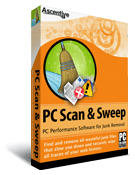
|
  PC Performance Software for Junk Removal PC Performance Software for Junk Removal
  Activation is required to remove all junk files found. |

Overview
Clean Windows Registry and keep your computer running like new
Each time you use your computer, temporary files and junk files can pile up behind-the-scenes. Over time these files can take up huge amounts of space on your computer and cause your system to run slowly. PC Scan & Sweep is an easy-to-use program that finds junk files on your PC and wipes them away in just one click. Our Windows cleanup software is that simple!
In three effortless steps you can find and remove Windows registry junk files and temporary Internet files for a faster and safer computer.
- Download and Install our Free PC Scan for Junk files.
Try PC Scan & Sweep's free scan to see how many junk files are found on your PC. Click the red button called Start Free Scan and download in minutes. Ascentive's Easy-Install™ instructions will instruct you through set up. - Scan your PC.
With one click of your mouse, PC Scan & Sweep will run a deep scan to reveal all useless registry entries and junk files found that can make your system run slow. PC Scan & Sweep not only cleans your registry but also removes temporary Internet files that can store personal information. - You'll have a clean Windows registry and remove numerous junk files on your PC.
Once you have seen all the junk that is hogging up precious space on your computer, you can quickly clean and refresh your PC by purchasing a 1 year subscription to run PC Scan & Sweep junk file removal & registry cleaning software. No extra installation is needed, and your satisfaction is guaranteed. If your PC isn't cleaner than before, just contact us in 30 days for a no questions asked refund of your software.
Junk Removal Made Easy
Ascentive's junk file removal & registry cleanup software is easy to use and even easier to download. There are no complicated settings, no confusing manuals to read and no annoying 3rd party ad popups. With a simple one-click download and step-by-step Easy-Install, Ascentive Software is the perfect solution to get your PC up to speed.
Features and Benefits
Use a registry cleanup utility and junk file remover to make your computer run like new!
Imagine what would happen if you never cleaned your desk at work, and just stacked files and papers on top of each other - it would take up valuable space and slow you down when you wanted to find something. This is exactly what happens each time you use your computer. Junk files and temporary Internet files are created behind-the-scenes even when performing the simplest tasks like checking email, browsing the web, or creating new documents. Over time these files accumulate and take up space on your computer, which can make your system run slow.
Ascentive has created a simple scan that locates junk and clutter files and securely performs a registry cleanup to sweep them off your hard drive. Take our FREE PC Performance Scan to see how many junk and clutter files are found holding you back. Learn how to cleanup your Windows registry with PC Scan & Sweep.
Once you try our registry cleanup utility and junk file remover you will be amazed to see how many things could be slowing you down. Scan & Sweep is the registry cleaner for Windows that can speed up your PC in minutes.
At a Glance:
PC Scan & Sweep:- Cleans your Registry sweeping away all registry junk and clutter files found with a single click.
- Removes Harmful Junk Files ridding your PC of behind-the-scenes junk that can slow you down.
- Speed up your System freeing up valuable system resources by removing all the junk files found on your PC.
- Empties all Temporary Folders keeping your personal information secure by getting rid of all the temporary Internet files found on your computer
Is there an easy way to securely erase Internet history?
Each time you use the Internet your computer records a copy of every page you visit, and all of the information that you enter. These temporary Internet files are created so that you can browse your favorite pages more quickly and so that you can store information in online accounts and shopping carts. Most of these files are harmless junk and clutter but over time they can take up large amounts of space on your computer, slowing it down more and more. Try Ascentive's FREE PC Performance Scan to see how our junk file removal & registry cleanup utility can improve the performance of your Windows PC. Click the Start FREE Scan button now to begin.
Features of PC Scan & Sweep
- Junk Files
- Windows Temporary Files
- Recycle Bin Files
- Temporary Internet Files
- Cookies
- Document Access Records
- File Search History
- Computer Search History
- Text Search History
- Displays total Reclaimed Disk Space
- Expanded info of all Junk File Types
- Familiar Windows Look-and-feel
- Automatic Scan Schedule
- Securely Wipe Files containing Personal Information
- Easily set Start-up Preferences
Ascentive's junk file removal & registry cleanup software is easy to use and even easier to download. There are no complicated settings, no confusing manuals to read and no annoying 3rd party ad popups. With a simple one-click download and step-by-step Easy-Install, our computer performance improvement software is the perfect solution to get your PC up to speed.
Testimonials
Since 1998, Ascentive Software has been used by hundreds of thousands of people and businesses, with registered customers in over 55 countries. If there is one thing they all share it is a love of our products. See the testimonials below to see what customer’s are saying about PC Scan & Sweep
"It's amazing what 'Scan & Sweep' finds lurking on the hard drive!"
R. Paschak, Fredonia NY USA

"Your programs help keep the clutter down on my PC. I do not have to manually delete cookies, temp files and history anymore. Also, it helps with the" little errors" that arise from other people jumping around from site to site without closing out the sites that they are not using anymore. I do not find the need to go in and clean my computer or compress files as much as I did before. Thank you for such wonderful products."
S. Ptak, Westmoreland NY USA
"I have an old Dell 5600, and accumulated a ton of old junk and clutter files, dead files and programs. This the first time that I have gotten rid of all the stuff."
Norman F. Dessel, PhD, SanDiego CA USA
Why do I need PC Scan & Sweep?
How often should I run PC Scan & Sweep?
How do I use PC Scan & Sweep?
What is the difference between PC Scan & Sweep and Registry Cleaner?
Answer: As you use your PC, Temporary Internet Files, unwanted cookies, and invalid links can accumulate on your machine, causing it to run much slower than is acceptable for today’s standards. Scan & Sweep not only identifies and locates many problems, but eliminates them as well.
Answer: To put it simply, more often is better. You can have PC Scan & Sweep set to automatically activate every day at startup or you can manually run it when you choose. If you use the computer every day, the program should be run a few times a week at minimum.
Answer: After successfully downloading and installing your software open the program (click Start and scroll to Programs --> Ascentive --> PC Scan & Sweep) and click “Scan Now”. When your software has completed its scan, click on “Review” to look over the found clutter, and “Remove Now” to remove it from your machine.
Answer: Both speed up your computer and make it more efficient, but they work in very different ways to achieve that goal. Scan & Sweep finds and deletes all of the junk and clutter files found that hinder your computer's performance while Registry Cleaner works by finding and repairing many of the common errors that cause a slow start-up and many other problems on your PC.
PC Scan & Sweep System Requirements
Your computer must meet the following system requirements in order to run the application effectively:
Supported Operating Systems & Minimum hardware requirements:
| Windows XP | Windows Vista (32 bit) | Windows Vista (64 bit) |
|---|---|---|
| Pentium 233 MHz processor (300 MHz Recommended) | 1 GHz 32-bit (x86) processor | 1 GHz 64-bit (x64) processor |
| 64 MB RAM (128 MB Recommended) | 512 MB RAM | 1 GB RAM (4 GB recommended) |
| Windows 7 (32 bit) | Windows 7 (64 bit) | Windows 8 (32-bit) |
| 1 GHz 32-bit (x86) processor | 1 GHz 64-bit (x64) processor | 1 GHz processor or faster with support for PAE, NX, and SSE2 |
| 1 GB RAM | 2 GB RAM (4 GB recommended) |
1 GB RAM or higher |
| Windows 8 (64 bit) | Windows 10 (32 bit) | Windows 10 (64 bit) |
| 1 GHz processor or faster with support for PAE, NX, and SSE2 |
1 GHz processor or faster with support for PAE, NX, and SSE2 |
1 GHz processor or faster with support for PAE, NX, and SSE2 |
| 2 GB RAM or higher | 1 GB RAM or higher | 2 GB RAM or higher |
| Hardware Requirements |
|---|
| Keyboard and Mouse |
| Monitor with Super VGA (800 x 600)or higher resolution |
| 50 MB available free space on hard drive |
| User Rights |
|---|
| Administrator |
| Other |
|---|
| Microsoft Internet Explorer 6.0 or higher |
| Internet Access |