



Getting Errors Fixed
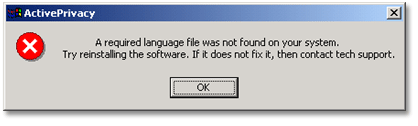
Required Language File is Missing
For some unknown reason, a component of your program is missing. However, this can be easily restored. You will need to download a Language File to the install directory of your program. The file will be different depending on what program you have.
Please follow the instructions below and note the different steps for ActivePrivacy, ActiveSpeed, and ActiveDefender.
For ActivePrivacy:
For most people, your install directory is probably here:
C:\Windows\Program Files\Ascentive\ActivePrivacy
If it is some place else, just be sure to download the Language file inside the ActivePrivacy folder. The Language File will need to be in the same directory as AP.exe.
RIGHT-CLICK HERE and select “Save As...” (or “Save Target As...”) and download APLOC.dll to your ActivePrivacy install directory. Do not attempt to run this file, it is not a program. It simply needs to be in the ActivePrivacy directory for ActivePrivacy to function.
For ActiveDefender:
For most people, your install directory is probably here:
C:\Windows\Program Files\Ascentive\ActiveDefender
If it is some place else, just be sure to download the Language file inside the ActiveDefender folder. The Language File will need to be in the same directory as AD.exe.
RIGHT-CLICK HERE and select “Save As...” (or “Save Target As...”) and download ADLOC.dll to your ActiveDefender install directory. Do not attempt to run this file, it is not a program. It simply needs to be in the ActiveDefender directory for ActiveDefender to function.
For ActiveSpeed:
For most people, your install directory is probably here:
C:\Windows\Program Files\Ascentive\ActiveSpeed
If it is some place else, just be sure to download the Language file inside the ActiveSpeed folder. The Language File will need to be in the same directory as AS.exe.
RIGHT-CLICK HERE and select “Save As...” (or “Save Target As...”) and download ASLOC.dll to your ActiveSpeed install directory. Do not attempt to run this file, it is not a program. It simply needs to be in the ActiveSpeed directory for ActiveSpeed to function.